
You can change the display name of your WordPress account, which shows on WordPress posts and comments.
1. Log in to the WordPress dashboard.
2. From the Dashboard menu, go to Users and click on Profile.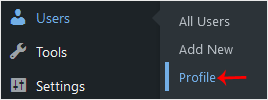
3. Locate Nickname and enter your new name.
4. From the Display name publicly as, choose your newly added nickname from the drop-down menu.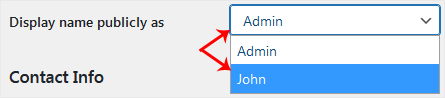
5. Scroll down to the bottom of the page and click on Update Profile.
İlgili diğer dökümanlar
How to Access the WordPress Admin Dashboard
WordPress is an easy to work with CMS software. To access a WordPress...
How to Remove Sample Comments and Posts From WordPress
You get sample comments and posts in a fresh WordPress install. You can...
How to Write and Publish Your First Blog Post in WordPress
Writing your first blog post is a fascinating thing. Follow the steps below...
How to Remove a Post in WordPress
You can remove the published or draft post in WordPress.1. Log in to the...
How to Bulk Delete Posts in WordPress
It is possible to delete posts in bulk using WordPress. You can also delete...