
You can use a spam filter to block emails by size.
1. Log in to your DirectAdmin Account.
2. In the E-mail Manager section, click on SPAM Filters or type SPAM Filters in the navigation filter box, and the option will appear. Click on it.
3. Under Block By, choose the Size option from the drop-down menu.
4. In Value, select the size in KB or MB and enter the value.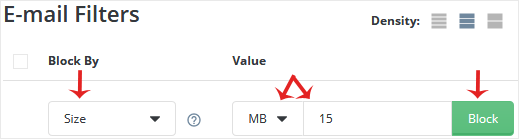
5. Click on Block.
If you have chosen size in MB and have entered the value 5, all emails exceeding 5MB in size will be blocked.
İlgili diğer dökümanlar
How to Enable Apache SpamAssassin in DirectAdmin
1. Log in to your DirectAdmin Account.2. In the E-mail Manager section, click...
How to Disable Apache SpamAssassin in DirectAdmin
1. Log in to your DirectAdmin Account.2. In the E-mail Manager section, click...
How to Block Email Using Spam Filters in DirectAdmin
You can use spam filters to block emails from specific email addresses. 1....
How to Block Emails Containing the Stop Word in DirectAdmin
DirectAdmin allows you to block emails containing the Stop word. 1. Log in...
How to Remove Email Spam Filters in DirectAdmin
You can remove email filters from your DirectAdmin account. 1. Log in to...